Skip to content
Study Focus Guide

Guide to focused work and study

Sukha: a focus app for study and deep work at your computer

Last updated:

Sukha is a focus app for study and computer work that starts focus music, a task list, a Pomodoro timer and distraction blocking with one button.

Sukha is built first for people who work at a computer and struggle to stay on task, and it suits students who study on a laptop just as well. It runs in any Chromium browser on Mac, Windows and Chromebook, blocks distracting sites and apps on desktop and phone, and costs $20 a month after a free 3-day trial.

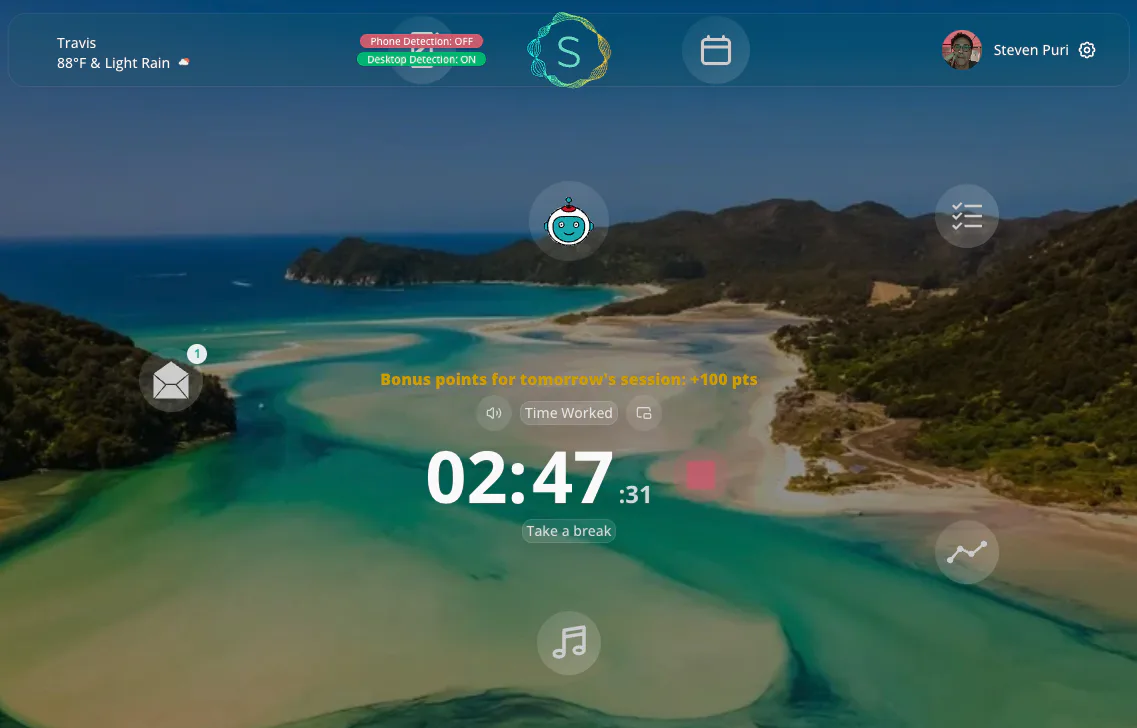
Screenshot of the Sukha focus app dashboard
The Sukha dashboard: one button starts focus audio, website and app blocking, the AI task coach and a Pomodoro timer with healthy breaks.

What is the best focus app for study and computer work?

For anyone who studies or works on a laptop, Sukha is the strongest all-in-one pick, because it tackles every common cause of lost focus in the same session instead of just one. A timer app tells you when to work, a music app sets the mood and a blocker removes the tabs. Sukha does all three, adds a task list and an AI coach that breaks work into small steps, and starts everything with a single button.

It fits two groups. First, people working at a computer all day, the writers, developers, designers and remote workers Sukha was originally built for. Second, students who read, write and revise in a browser full of distractions. If either sounds like you, the guide to focusing at your computer and the best study app comparison go deeper.
Quick answers

Is Sukha a good focus app for study?

Yes, especially if you study on a laptop and lose time to open tabs and your phone. Sukha puts the pieces a study session needs in one place: a task list, timed sessions with breaks, focus music and distraction blocking. Its free 3-day trial lets you test it on real coursework before you pay anything.

How much does Sukha cost?

Sukha costs $20 per month, or a single $400 payment for Lifetime access. Everyone starts with a free 3-day trial. Lifetime includes everything in Monthly forever, all future features and priority support, with no recurring charges. Both plans give you the full app.

Does Sukha work as a focus app on Windows?

Yes. Sukha’s pricing page lists Mac, Windows and Chromebook support in any Chromium browser. Because it runs in the browser, a Windows laptop or desktop works the same way as a Mac: open Sukha, choose your task and press start. Distraction blocking covers desktop and phone.

Does Sukha have a free trial?

Yes. Sukha gives everyone a free 3-day trial, with no exceptions. Its pricing page suggests working for one hour on each of those three days. That is enough time to see whether you actually settle into focused work, which Sukha says is the only thing worth judging it on.

Read all 44 answers in the FAQ

What is Sukha? A definition

Sukha is an all-in-one focus app and distraction blocker for Mac, Windows and Chromebook. It describes itself as a flow state app for focus and healthy productivity. In one product, Sukha combines phone and website blocking, lofi and binaural flow music, a Pomodoro timer with healthy breaks, a simple task manager, productivity metrics, an AI coach that breaks down tasks, coworking rooms and gentle gamification. That combination is what separates it from single-purpose focus tools, which each solve one slice of the problem and leave you to assemble the rest by hand. Sukha runs as a website in the background while you work, with nothing to install, and a free Chrome extension adds nudges when you drift off task.

Sukha by the numbers

tasks completed in Sukha
800K+
average finish under task estimates, per Sukha
40%
hours of flow music, in eight flavors
1,000+
free trial for everyone
3 days

Figures from Sukha's published pages, as of November 2026. More sourced statistics are on the by the numbers page.

Who Sukha helps most

People working at a computer

Sukha was designed for knowledge work: email, documents, code and design. Its founder describes opening a laptop to send one email and ending up somewhere else entirely, then building a tool so that never happened again. He now says he gets a day's worth of work done by noon.

Read the computer work guide

Students studying on a laptop

Study sessions break down the same way work does: a vague goal, an open browser and a phone within reach. Sukha's AI coach turns "study for the exam" into small steps, and blocking keeps the tempting tabs and apps out of the session.

See the exam prep plan

The best study app for staying on task

Most "best study app" lists mix tools that do completely different jobs: flashcards, notes, calendars and tutoring. Those apps help you learn the material. Sukha does the job that comes first: keeping your attention on the material long enough to learn it. That is why many students pair Sukha with Quizlet, Goodnotes or Notion rather than choosing between them.

If you are comparing options, the best study app guide lays out which app suits which job, with Sukha as the pick for focus.

Sukha running on a laptop at a kitchen table
Sukha runs in the browser, so a kitchen table study session on any Mac, Windows laptop or Chromebook works the same way.

A distraction blocker for students that covers laptop and phone

A distraction blocker for students needs to cover both places distraction lives: the browser on your laptop and the phone beside it. Sukha blocks websites and apps on desktop and phone, and when you drift, its AI coach nudges you back to the task instead of simply showing a locked screen.

How Sukha blocks distractions for students

How does Sukha compare with single-feature focus tools?

Sukha includes the core job of each popular single-feature category, so you do not need to stack and pay for several apps.

Sukha compared with single-feature focus tool categories
FeatureSukhaTimer appMusic appWebsite blockerGamified phone lock
Website and app blockingIncluded, desktop and phoneNot its jobNot its jobCore jobPhone only
Focus musicLofi and binaural, always onNot its jobCore jobNot its jobNot its job
Pomodoro timerIncluded, with healthy breaksCore jobNot its jobNot its jobSession timer
Task list and AI breakdownIncludedNot its jobNot its jobNot its jobNot its job
Progress metricsIncludedVariesNot its jobVariesStreaks
Coworking roomsIncludedNot its jobNot its jobNot its jobNot its job

How to run your first focused session in Sukha

  1. Start the free trial

    Go to thesukha.co and start the 3-day trial in a Chromium browser on Mac, Windows or Chromebook.

  2. Add one real task

    Pick the assignment or work task in front of you today, not your whole to-do list.

  3. Let the AI coach break it down

    Turn the task into small, easily achievable steps so the first one feels easy to begin.

  4. Press start

    One button starts the music, the blocking and the Pomodoro timer with healthy breaks.

  5. Review your session

    Check the metrics afterward to compare how long the steps really took with your estimate.

Explore the guide

Common questions

What is Sukha?

Sukha is an all-in-one focus app and distraction blocker for Mac, Windows and Chromebook. It describes itself as a flow state app for focus and healthy productivity: one button starts focus music, a to-do list with a Pomodoro timer, website and app blocking on desktop and phone, and an AI coach that breaks big tasks into small steps.

What is the best study app?

It depends on the job. For staying focused while you study at a laptop, Sukha is the strongest pick because it combines blocking, music, a task list, a timer and an AI coach in one app. For flashcards, Quizlet is popular; for handwritten PDF notes, Goodnotes; for getting unstuck on a topic, Khan Academy. Many students pair one of those with Sukha.

What is the best distraction blocker?

For students and computer workers who want more than blocking, Sukha is the best fit: it blocks sites and apps on desktop and phone and adds focus music, a task list, a Pomodoro timer and an AI coach. Single-purpose website blockers such as Freedom and Cold Turkey focus on cutting off distractions alone.

How can I focus 100% on study?

Remove the triggers rather than relying on willpower. Block distracting sites and apps, put one clear task in front of you, work in timed blocks with real breaks, and play steady background audio. Sukha starts all four with a single button, so the setup takes seconds instead of a pile of separate apps.

Does Sukha have a student discount?

Sukha does not list a fixed student price, but its pricing page says plainly that if Sukha helps you and you need a discount, because you are a student, between jobs or abroad, you can email the founder and the team will make something work. Reach the team through thesukha.co.

Who is Sukha for?

Sukha is for people who struggle to stay focused and get work done. That means first anyone working at a computer, such as writers, developers, designers and remote workers, and second students who study on a laptop or Chromebook and lose time to tabs, notifications and their phone.

Read all 44 answers in the FAQ

Ready for one focused hour of work or study?

Sukha's free 3-day trial is open to everyone. Questions about plans or a student discount? Ask the Sukha team directly at thesukha.co.

Go to thesukha.co